
In today’s digital age, data is a powerful asset. The ability to gather and analyze data from websites can offer valuable insights for business decisions, market analysis, and academic research. One of the most efficient ways to collect data from the web is through web scraping. If you’re a beginner and want to learn how to extrac HTML to PDF APIt data from websites, this step-by-step tutorial will guide you through the basics of web scraping, the tools you’ll need, and how to get started with your first scraping project.
- What is Web Scraping?
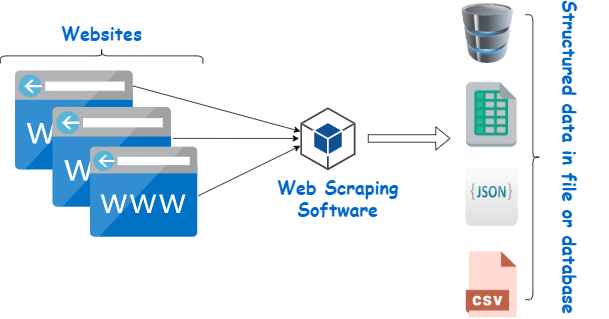
Web scraping is the process of extracting data from websites by simulating human browsing behavior, using a tool or script. Unlike manual data collection, web scraping allows you to gather large volumes of data from multiple pages in a fraction of the time. You can scrape structured data (like tables, product listings, or contact details) or unstructured data (like text from articles, reviews, or blog posts). The goal is to convert unstructured web data into a structured format (such as CSV, Excel, or JSON) that’s easier to analyze and use.
While web scraping can be highly useful, it’s important to do it responsibly and ethically. Many websites have robots. txt files that indicate which parts of the site can be scraped and which should not. Always make sure to respect these rules to avoid violating terms of service or getting blocked by websites.
- The tools You need for Web Scraping
Before you start web scraping, there are a few tools and libraries you’ll need. The most common tool for scraping is Python, a popular programming language due to its simplicity and the availability of powerful libraries. For beginners, we will use the following libraries:
Requests: This library allows you to send HTTP requests to a website and retrieve the page’s content.
BeautifulSoup: A Python library used to parse HTML or XML documents, making it easier to extract specific information from the webpage’s structure.
Pandas: While not strictly necessary for scraping, Pandas helps you clean and store your data in a structured format like CSV or Excel.
To get started, you need to install these libraries. You can do this by running the following commands in your terminal or command prompt:
bash
Copy code
pip install requests
pip install beautifulsoup4
pip install pandas
Once the libraries are installed, you’re ready to start your first scraping project!
- How to Send a Request and get Web page Content
The first step in any web scraping task is to retrieve the content of a webpage. To do this, you need to send an HTTP request to the website’s server and get the page’s HTML content. The Requests library makes this process simple.
Here’s a basic example of how to fetch a webpage using Python:
python
Copy code
import requests
Define the URL of the website you want to scrape
url = ‘https: //example. com’
Send a GET request to the website
response = requests. get(url)
Check if the request was successful (status code 200)
if response. status_code == 200:
print(“Successfully fetched the page”)
page_content = response. text
else:
print(“Failed to retrieve the page”)
In this example, requests. get(url) sends an HTTP GET request to the specified URL. If the request is successful, it returns the page content as text, which can be further processed. The status_code helps you verify if the request was successful. A status code of 200 indicates that the request was successful, while any other code (like 404 or 500) means there was an issue.
- Parsing the HTML with BeautifulSoup
Once you have the webpage’s content, the next step is to parse the HTML structure so you can extract the data you need. This is where BeautifulSoup comes in. BeautifulSoup allows you to navigate through the HTML tags, classes, and attributes to locate the information you’re interested in.
Here’s an example of how to use BeautifulSoup to parse the HTML content and extract data:
python
Copy code
from bs4 import BeautifulSoup
Parse the page content using BeautifulSoup
soup = BeautifulSoup(page_content, ‘html. parser’)
Find specific elements, e. g., all
tags (for headings)
headings = soup. find_all(‘h2’)
Print the text inside each heading
for heading in headings:
print(heading. text)
In this example, BeautifulSoup(page_content, ‘html. parser’) converts the page content into a BeautifulSoup object that you can interact with. The find_all() method is used to search for all instances of a specific HTML tag (in this case,
